Start with your process.
Search running programs, launch your own EXE, or use the built-in host with an alertable worker and GUI message loop.
NATIVE WINDOWS DEBUGGING
Load native DLLs into your own test programs. Compare loading methods and see what happens inside.
Download v1.1.4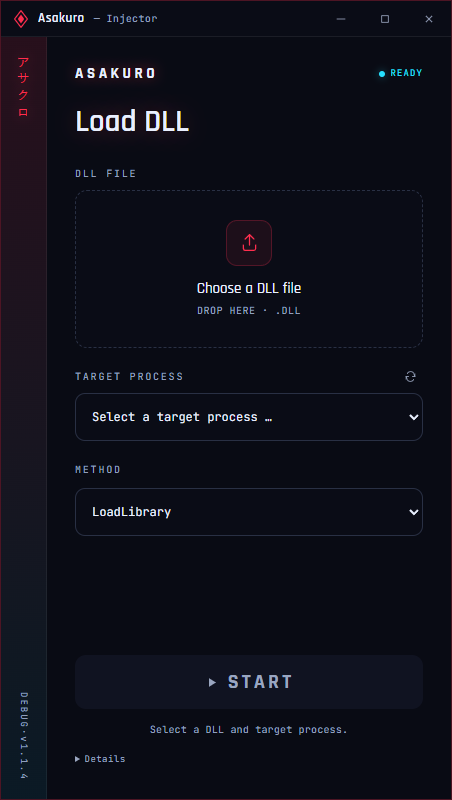
LESS FRICTION. MORE SIGNAL.
Everything you need for a focused DLL test, with the details one click away.
Search running programs, launch your own EXE, or use the built-in host with an alertable worker and GUI message loop.
Inspect the DLL format, architecture and SHA-256. Before each run, Asakuro checks the file and target identity again.
See the returned module address, English diagnostics and timestamped logs. Windows-loader methods also confirm the complete DLL path.
Export your run as JSON for debugging and comparisons. Keep the context that matters beyond the current test.
CHOOSE YOUR LOADING PATH
Explore the requirements before you run. The desktop app disables methods when the required Windows API is unavailable.
WINDOWS LOADER
The familiar loading path. A thread started with CreateRemoteThread calls the standard Windows DLL loader.
The Windows module list confirms the full DLL path. An already loaded DLL is detected without initializing it again.
NATIVE THREAD
Starts a loader thread through NtCreateThreadEx, then uses LoadLibraryW to load your native DLL.
The x32 edition disables this method after local x86 checks returned STATUS_ACCESS_DENIED.
EXISTING THREAD
Queues the load operation on an existing target thread. It runs when that thread enters an alertable wait.
The built-in host supplies an alertable worker. Selecting a thread in your own program does not guarantee an alertable wait.
SPECIAL USER APC
Uses QueueUserAPC2 with a Special User APC to schedule the load on an existing target thread.
API availability is checked at startup. The method is disabled when Windows does not expose it.
GUI MESSAGE LOOP
Loads through SetWindowsHookEx on a GUI thread that is actively processing its message loop.
ArasakaHookProcThe included Analysis DLL v5 provides the required hook export. The built-in host provides a GUI message loop.
EXISTING THREAD
Redirects an existing thread for the load call, then restores its state so the original work can continue.
Target and thread checks keep the selected context tied to the intended process.
CUSTOM PE LOADER
Loads supported native x64 DLLs with the custom PE loader, including relocations, ordinary imports and x64 unwind tables.
Mapped images are absent from the Windows module list. Use a fresh target for each test; repeated mapping can create another instance.
NATIVE ORDINARY APC
Queues an ordinary APC using the native API. The selected thread must enter an alertable wait to perform the load.
Use the built-in alertable host worker for a controlled comparison with QueueUserAPC.
NATIVE SPECIAL APC
Schedules the load through the native Special APC API on an existing target thread.
The app checks API availability and explains when this method cannot be used.
NATIVE THREAD
Uses RtlCreateUserThread to create a target thread that loads your DLL through LoadLibraryW.
The result includes the module address and Windows-loader path confirmation.
NATIVE DLL LOADER
Calls the native DLL loader from a loader thread, providing another path to compare with LoadLibraryW.
As with other Windows-loader methods, Asakuro verifies the DLL path and records the returned module address.
Method information only. DLL loading runs in the Windows desktop app.
INCLUDED ANALYSIS DLL / x64
Analysis v5 opens an English console inside your target process. Follow module and thread activity alongside CPU, memory and handle statistics.
No extra viewer EXE. Add your own messages through ArasakaAnalysisLogW.
[DLL LOADED]Module activity[THREAD START]Thread lifecycle[STATS]CPU · memory · handlesYOUR MESSAGEApplication logsActual event categories · live values appear in the target console.
READY FOR YOUR NEXT TEST
Two standalone Windows EXEs. One download.
No installer, Node.js or separate .NET setup.
ZIP · 236.4 MB · RELEASED 06 OCT 2026
Includes both EXEs, Analysis DLL v5 (x64), a startup guide and the changelog.
BEFORE YOU START
The right edition and a fresh target make comparisons easier.
Match the injector, target process and native DLL: x64 for 64-bit, x32 for 32-bit. The x32 edition supports LoadLibrary / CreateRemoteThread; the eleven-method set is x64. Pure managed .NET DLLs and ARM64 are not supported.
Windows 10 or later with the runtime’s required updates. Each portable EXE includes its matching native helper and runtimes. The x32 edition was tested under WOW64 on x64 Windows; a separate 32-bit Windows installation was not tested. Access uses your current Windows permissions.
Start a fresh target process. A DLL stays loaded until the target exits, and Windows-loader methods detect an already loaded DLL. User-launched programs keep running when Asakuro closes; the built-in test host closes with the app.
It supports native x64 relocations, ordinary imports, TLS callbacks without static TLS, and x64 unwind tables. CLR / mixed-mode DLLs, static TLS, delay imports and unsupported LoadConfig / CFG features are rejected. Mapped images do not appear in the Windows module list and do not support GetModuleHandle, FreeLibrary or automatic thread notifications. Use a fresh target per test.
On a console created by Analysis DLL v5, Ctrl+C stops monitoring while your target keeps running. The analysis DLL is x64 only and is included in the main ZIP.